Yes. The operative General Order Re Mandatory Electronic Filing for Civil is posted on the Court’s website at: http://www.lacourt.org/division/efiling/pdf/GenOrdCivilEfiling.pdf. The Court suggests that litigants read the order before reviewing these FAQs.
Electronic filing of court documents occurs through an electronic filing service provider (EFSP). The user creates an account and the efiling system manages the flow of the documents and fees to and from the Court. The filer will submit the documents to the EFSP for submission to the Court. The Court will accept or reject the documents. The documents are returned to the EFSP for return to the filer through the EFSP’s electronic filing portal.
Self-represented litigants are not mandated to file documents electronically; however, they may choose to do so if desired.
Yes. Litigants represented by attorneys in non-complex civil cases must efile unless they have obtained a court order for exemption. If you are an attorney who cannot use the efiling system, and your case is pending in the Central district, you may apply to Department 1 in the Stanley Mask Courthouse for an exemption from mandatory electronic filing. If your case is pending in another district, you may apply to the supervising judge of that district for an exemption from mandatory electronic filing. You must use the Judicial Council Forms EFS-007 and 008.
Please refer to the “Technical Requirements” section of the operative General Order Re Mandatory Electronic Filing for Civil. This section sets forth all of the Court’s requirements for the formatting of the documents.
Yes. The following documents are excluded from efiling:
- Peremptory challenges or challenges for cause of a judicial officer pursuant to Code of Civil Procedure Sections 170.6 or 170.3
- Bonds/undertaking documents
- Trial and evidentiary hearing exhibits
- Any ex parte application filed concurrently with a new complaint, including those that will be assigned to the Writs and Receivers departments in the Stanley Mask Courthouse.
- Documents submitted conditionally under seal. The actual motion or application shall be electronically filed. A courtesy copy of the electronically filed motion or application to submit documents conditionally under seal must be provided with the documents submitted conditionally under seal and delivered directly to the courtroom to which the case is assigned.
If your case requires the appointment of a guardian ad /item (GAL), the application and proposed order must be submitted with the initial complaint. Once the GAL is approved by the Court, the summons may be submitted for issuance by the clerk.
Except for lodged documents in support of a motion, documents that are exempt from efiling can be submitted for filing in the Clerk’s Office of the Civil Division between the office hours of 8:30 a.m. and 4:30 p.m. or by mail (visit www.lacourt.org for courthouse addresses).
No. Efiling is not the same as fax filing. For efiling, the filing party must use an EFSP and submit documents for filing over the internet. With the exception of Small Claims and Complex, the Court will no longer accept fax filing for civil documents. Once efiling is implemented for Complex, fax filing will no longer be available.
No. Fax filing will not be available for civil documents after efiling is implemented for each civil case type.
No. Efiling has replaced eDe/ivery. For efiling, the filing party must select from a variety EFSPs and submit documents through the EFSP for filing over the internet.
Yes. You can use your personal computer to submit filings through an EFSP. You will use the internet to select the EFSP and submit your documents for filing. You will upload the document as an attachment. For instructions, refer to your EFSP’s website.
You may use any EFSP that is listed on the Court’s website. You may view the EFSP list at: http://www.lacourt.org/division/efiling/civi/_providers.aspx.
Registration as an electronic filer is required to establish an account for your electronically filed documents. Your account will allow you to check the status of your electronically filed documents and will provide a path for the Court to return your documents to you.
Yes. You may choose any EFSP. You may change to a different service provider at any time. Selecting and using an EFSP is similar to using an “attorney service” for filings, except the types of filings processed are electronic.
Yes. The Judicial Council has mandated that all Courts accepting electronically filed documents use independent EFSPs. Pursuant to Code of Civil Procedure Section 1010.6(e) the Court may not accept electronic filings directly. You can find a list of approved service providers on the Court’s public website at: http://www.lacourt.org/division/efiling/civil_providers.aspx.
Yes. The Court and the EFSP will charge for efiling and all fees are collected by the EFSP when the filing is submitted. For court fees related to electronic filing, refer to the Court’s official fee schedule at: http://www.lacourt.org/forms/pdf/fees/fee-schedule-2019.pdf.
Efiling fees may be recoverable pursuant to Code of Civil Procedure Section 1033.5.
Please check with the EFSP of your choosing for specific information regarding payment types. Credit cards and electronic checks are accepted.
Absent a fee waiver, fees are required for all filings, including filings from court-appointed attorneys.
Turnaround time will depend on the type of document filed. The Court attempts to confirm the filing or receipt of documents within two business days. Proposed orders, writs, abstracts, and other documents requiring review and/or further action by the Court may take longer than two days to process.
No. Documents that are electronically filed and accepted by the Court are automatically uploaded to the Court’s case management system. This allows court staff and judicial officers to electronically view the case documents without printing the documents or maintaining physical court files. The electronic record is the official court record pursuant to Government Code Section 68150(a).
You may submit your filings electronically 24 hours a day. Any efiling received by the Court before midnight will be deemed received or filed on the same business day if accepted. Any efiling submitted after midnight will be deemed received or filed as of the next business day if accepted.
Filing parties may view submitted documents immediately through their EFSP’s portal. All other parties will be able to view a document from the internet, or on public terminals located at any Los Angeles County courthouse, after filing by the Court if the person opens an account with the court which requires payment of fee. A document is not considered filed until it is accepted by the Court. However, unlimited civil complaints will be available to the media upon submission, prior to review for acceptance by the Court.
No. Statutory requirements apply for preservation of any statute of limitation on filings, including those submitted electronically. efiling does not change the “last day to file” requirements.
Any Notice of Rejection sent by the Court will include the reason for the return of the document. If your document is rejected, correct the deficiency and resubmit the document via eFiling. If the document is not timely filed as a result of the rejection or filing error, you will need to apply to the Court for relief or other corrective order.
A transaction through the EFSP for submission of documents to the court for filing or processing, which may contain one or more PDF documents.
A Filing Document Name refers to the type of filing (e.g. answer, demurrer, motion, etc.) and is used by the EFSP to properly designate the document(s) upon submission. Using the correct Filing Document Name is extremely important as it determines the appropriate fee and court work/low. A list of the Court’s Filing Document Names is available on the Court’s website at http://www.lacourt.org.
If the document you are filing is not specified in the list of document names, you must use the name of the document that most closely describes your filing. You may also use a generic document name with name extension and fill in the name extension field. For example, use “Motion (Name Extension)” or “Brief (Name Extension)” and add the specific title of your document. There is also a “comments” field if you need to include any additional explanation for the filing staff.
If multiple documents are filed in one transaction, the lead document is the one that is most important. For example, if you were filing a motion with a supporting declaration and a proof of service, the motion would be the lead document. It is important to properly identify the lead document as this will affect the priority and timing for processing by the Court and ensures that the document is directed to the appropriate location or court personnel.
The transaction number is noted on your confirmation of filing.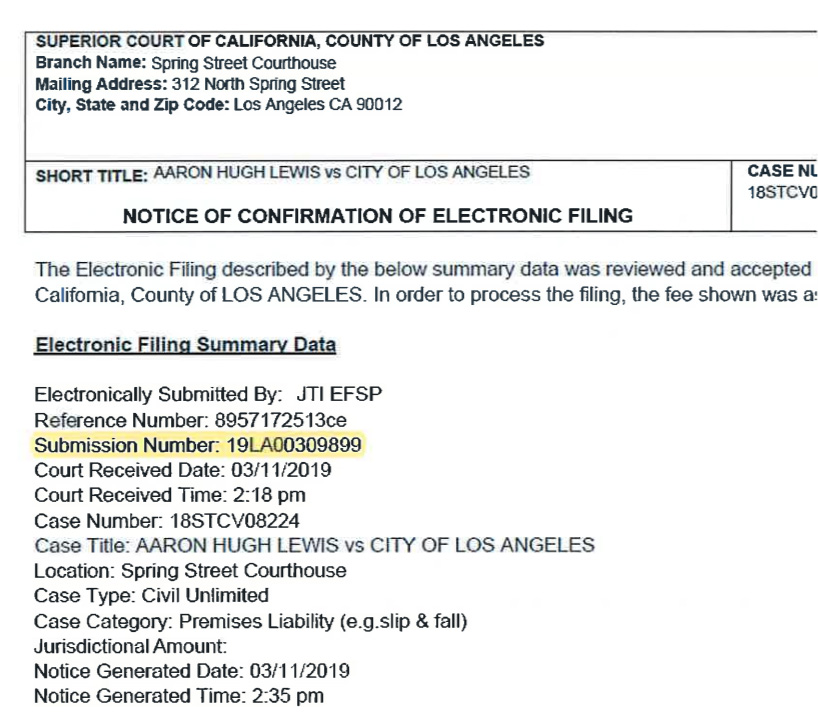
A bookmark is a PDF document navigational tool that allows the reader to quickly locate and navigate to a designated point of interest within a document.
An electronic link that provides direct access form one distinctively marked place in a hypertext or hypermedia document to another in the same or different document.
The Court is utilizing a filing stamp “ribbon” which will appear on the top of the first page of the efiled document returned to the efiler through the EFSP. If a document is received, a received stamp will be placed on the left margin. 
A new filing receives the assigned case number and judicial officer assignment upon acceptance of the filing. This information will appear on the top of the first page of the document. For unlimited civil complaints, in addition to the imprinted information, a Notice of Case Assignment will be returned electronically by the EFSP.
Your electronically filed document will be rejected and electronically returned to you through the EFSP for correction and resubmission with the proper filing location indicated.
In addition to failing to follow California Rules of Court rules 2.100 et seq., some common reasons a filing may be rejected by the Court include, but are not limited to:
- Documents are not submitted as separate PDFs in the same transaction/envelope, e.g. multiple documents are submitted as a single filed document.
- Information entered in data fields is incorrect or does not match the document image e.g. the incorrect Filing Document Name is selected, case number does not match.
- Party’s name or address does not match the party’s information stated on the document.
- Incorrect payment statement is selected, e.g. fee waiver or Government Code Section 6103.
- Incorrect case type or case category selected.
- Incorrect court location is selected.
- Duplicate submission.
- Untimely submission, e.g. ex parte application submitted after filing deadline.
- Motion submitted without a CRS reservation number.
- Document is not bookmarked and/or text searchable.